
Private Preview
ADA is provided as a complementary service for ADE customers, not as a separate product. It is offered as-is to accelerate ADE workflows through AI-assisted automation.
AI-powered data warehouse automation for Agile Data Engine (ADE). ADA combines a CLI toolkit with composable AI agent skills to help teams design, build, and manage data warehouse layers. From source data all the way to publish-ready facts and dimensions.
What is ADA?
ADA is a developer toolkit that bridges AI coding assistants and Agile Data Engine. It provides:
-
A CLI (
ada) for project setup, validation, and ADE integration -
A modular skill library that guides AI agents through data modeling workflows step by step
-
Project scaffolding with templates, configuration and modeling reference material
-
Bidirectional synchronization with ADE via its External APIs: pull existing entities, push new definitions, deploy, and monitor runtime execution
ADA works inside your AI coding environment (e.g., VS Code with GitHub Copilot, or Claude Code). You describe what you need in natural language, and the agent uses ADA's skills and CLI to produce version-controlled YAML entity definitions that synchronize directly with ADE.
How It Works
The Agent + Skills Model
ADA follows a skills-based architecture. Each skill is a self-contained guide that teaches the AI agent how to perform a specific data modeling task — analyzing source data, designing a Data Vault model, generating entity YAML, enriching metadata, and so on.
Skills chain together into a pipeline. For example, in a Data Vault architecture:
-
Staging generation
-
Analyze source data files and generate SOURCE + STAGE entity definitions
-
-
Data Vault analysis
-
Propose a Hub / Link / Satellite model from staging entities
-
-
Data Vault generation
-
Produce the Data Vault YAML definitions
-
-
Publish generation
-
Create facts and dimensions for consumption
-
-
Validate and synchronize
-
Validate definitions against ADE schema, push to ADE, and deploy to runtime
-
Each step produces YAML entity definitions stored in a local packages/ directory — version-controlled, auditable, and ready to synchronize with ADE.
The CLI
The ada CLI handles the lifecycle tasks that sit outside the AI agent's modeling workflow — project initialization, ADE credential management, schema validation, bidirectional entity synchronization with ADE, deployment, and health checks. The agent invokes CLI commands as needed during skill execution.
Supported Architectures
ADA supports multiple data warehouse architectures through its skill system:
-
Data Vault 2.0
-
Hub, Link, Satellite modeling with publish-layer facts and dimensions
-
-
Medallion
-
Bronze / Silver / Gold layered architecture
-
-
Simple
-
Staging with an intermediate transformation layer
-
The architecture is selected at project initialization and determines which skills are installed and available.
Integration with Agile Data Engine
ADA is designed to work as an extension of ADE, not as a standalone tool. Every entity definition ADA generates follows ADE's schema conventions and is meant to flow into ADE through its External APIs. The integration covers the full lifecycle: fetching configuration, creating and synchronizing entity definitions, deploying to runtime environments, and monitoring execution.
All API communication is authenticated using API keys stored securely outside the project workspace.
Configuration Sync (Setup)
During project initialization, ADA fetches configuration from ADE via the Package Export REST API. This includes entity type defaults (naming conventions, technical attributes, schemas), datatype definitions, load logic templates, load schedules, and registered source systems.
These are cached locally and used by skills when generating entity YAML. This ensures that generated definitions always align with the target ADE environment's configured defaults. The configuration can be refreshed at any time.
Entity Synchronization (Push / Pull)
The core integration point is the YAML-based entities REST API in the External API. It enables bidirectional entity synchronization between the local workspace and ADE's design environment.
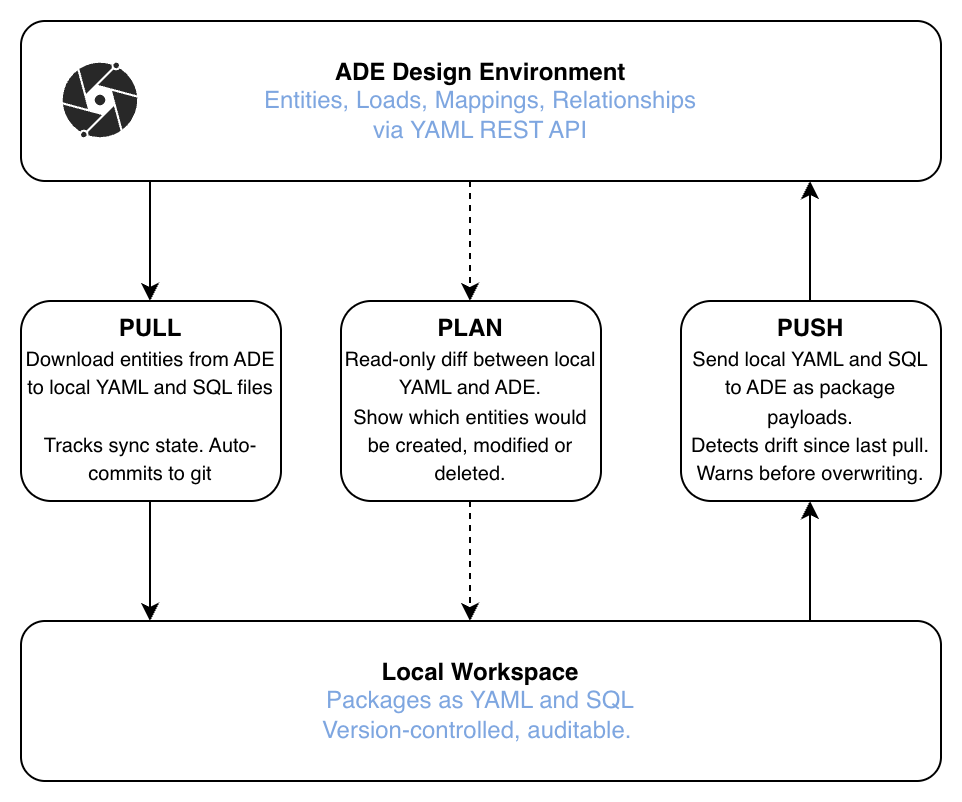
With the entities API, all entity-related metadata can be pulled, modified and pushed back to ADE. This enables a full development workflow of metadata with AI-assisted tooling.
Pull downloads entity definitions from ADE and writes them as per-entity YAML-files and optional SQL-files locally. This is how teams bootstrap an ADA project on top of an existing ADE implementation, or stay in sync when entities are also edited in ADE's UI. Pull includes sync state tracking and automatic git commits to maintain an auditable history.
Push assembles local YAML entity files into package payloads and sends them to ADE. Before pushing, ADA can detect drift (cases where ADE has changed since the last pull) and warn the user to avoid overwriting concurrent changes.
Plan is a read-only operation that shows the diff between local YAML and ADE without modifying anything. It answers the question "what would change if I pushed now?" by showing which entities would be created, modified, or deleted.
Entity YAML files use camelCase keys matching ADE's own key naming conventions, ensuring round-trip compatibility between push and pull operations.
Metadata Query (GraphQL)
ADA uses the ADE Metadata GraphQL API for lightweight supplementary queries alongside the primary YAML REST API. Current uses:
-
Audit metadata enrichment
-
Resolving package IDs and fetching entity-level audit fields (
meta_created,meta_updated, user info) to enrich local YAML files during ada pull and ada push.
-
-
Package discovery
-
Listing packages by name or description tag (e.g., ada pull --tag) with auto-pagination for large environments.
-
GraphQL is not used for fetching entity content, attributes, load mappings, or reference keys, since all entity data transfer is handled by the YAML REST API (ada pull / ada push).
Deployment
After pushing entities to ADE's design environment, ADA can promote them to runtime via the deployment API:
-
Commit
-
Promote a package from design to a target runtime environment (e.g., dev, test, prod)
-
-
DAG trigger
-
Start a workflow / DAG run in the target environment
-
These are independent operations. A commit does not automatically trigger a DAG, and vice versa. This gives teams control over when code is promoted and when it is executed.
Code Preview
Before deploying, ADA can fetch the SQL code that ADE would generate for pushed entities. This enables local review, and optionally local execution against the target database, before committing to a deployment.
Runtime Monitoring (MCP)
For runtime operations, ADA connects to the ADE MCP server (Model Context Protocol). This provides read access to workflow execution statistics, failed run details, and load-level error diagnostics.
This enables conversational troubleshooting. The agent can answer questions like "what failed last night?" or "why did the customer DAG result in an error?" by querying runtime data directly through the MCP connection.
Example promts for ADA
These example prompts can be used with ADA to develop and manage data warehouse metadata across all layers. From raw staging through to semantic models, as well as operate and monitor ADE environments.
Staging
-
"Generate staging from source_data/erp/customers.csv"
-
"Add descriptions to all attributes in STG_ERP_ORDERS"
-
"Create a staging view to unnest the nested JSON in STG_API_EVENTS"
Data Vault
-
"Analyze my staging entities and create a Data Vault design"
-
"Generate Data Vault entities from the staging package"
-
"Add a link between H_CUSTOMER and H_ORDER"
Generic transformation layer
-
"Design an intermediate layer from my staging entities"
-
"Generate transformation entities from the staging package"
Medallion
-
"Generate a silver layer from my bronze staging entities"
-
"Create a gold layer fact table from the silver entities"
-
"Design a medallion pipeline from source to gold"
Facts and Dimensions
-
"Design a star schema with customer dimension and order fact from Data Vault"
-
"Generate a publish layer with DIM_CUSTOMER and FACT_SALES"
-
"Add SCD2 historization to DIM_PRODUCT"
Semantic Model
-
"Generate semantic views from the publish layer"
-
"Create a semantic model for the sales star schema"
Operations
-
"What failed last night?"
-
"Show me the error for the customer DAG run"
-
"Trigger the STG_ERP_ORDERS DAG in dev"
General / cross-cutting
-
"Plan changes and make a dry run. If OK, push my changes to ADE"
-
"Pull the latest from ADE for STG_ERP_CUSTOMERS"
-
"Validate my YAML packages"
-
"Create an FTL template for a SCD2 merge load"
-
"Add database tags and masking policies to STG_ERP_CUSTOMERS"