
This guide explains how to manage integrations and secrets in the Admin UI. Integrations are connections to external systems, and secrets hold the credentials those integrations need to authenticate.
Overview
The Integration and Secret Management section is accessible per tenant and presents two panels:
-
Secrets — credentials and API keys used by integrations
-
Integrations — configured connections to external services
Because integrations depend on secrets, you must create a secret before you can create an integration that uses it.
Secret types
The following secret types are available. The secret type determines which credential fields are required and how authentication is performed.
Basic Authentication
Transmits credentials using Base64-encoding in the Authorization header.
|
Field |
Required |
Encrypted |
Description |
|---|---|---|---|
|
Username |
Yes |
No |
Username for basic authentication |
|
Password |
Yes |
Yes |
Password for basic authentication |
Compatible integration types: Rest API
Bearer Token
Transmits a pre-issued security token in the Authorization header with the Bearer prefix.
|
Field |
Required |
Encrypted |
Description |
|---|---|---|---|
|
Token |
Yes |
Yes |
Base64-encoded bearer token |
Compatible integration types: OpenAI LLM, Rest API
Entra ID Service Principal
Uses a non-human identity (service principal) to obtain security tokens from Microsoft Entra ID (Azure AD). Suitable for services that support OAuth2 client credentials flow.
|
Field |
Required |
Encrypted |
Description |
|---|---|---|---|
|
Tenant ID |
Yes |
No |
The Entra ID tenant (directory) ID |
|
Client ID |
Yes |
No |
The application (client) ID of the service principal |
|
Client Secret |
Yes |
Yes |
The client secret for the service principal |
|
Authority |
Yes |
No |
The authority URL for Entra ID authentication (e.g. `https://login.microsoftonline.com/<tenant-id>`) |
Compatible integration types: Power BI API, Rest API
API Key
Passes a single API key as the secret value.
|
Field |
Required |
Encrypted |
Description |
|---|---|---|---|
|
Value |
Yes |
Yes |
The API key value |
Compatible integration types: OpenAI LLM
Header Authentication
Passes credentials as arbitrary custom HTTP headers. Unlike other secret types this type has no fixed properties — you define any number of header name / value pairs when creating or updating the secret version.
Compatible integration types: Rest API
Integration types
The following integration types are available. The integration type determines the target system, which secret types are compatible, and which configuration properties are required.
OpenAI LLM
Connects to a service using the OpenAI LLM API protocol (compatible with OpenAI and other providers that implement the same API).
Compatible secret types: Bearer Token, API Key
Integration properties:
|
Property |
Required |
Type |
Default |
Description |
|---|---|---|---|---|
|
Base URL |
Yes |
Text |
— |
The base URL of the LLM API endpoint |
|
Default Model |
Yes |
Text |
`gpt-4.1-mini` |
The model identifier to use by default |
|
Timeout |
No |
Number |
— |
Request timeout in milliseconds |
|
Scope |
No |
Text |
— |
The OAuth2 scope for Entra ID authentication (only relevant when using Entra ID Service Principal secret) |
|
Max Output Tokens |
No |
Number |
— |
Maximum number of tokens the model may generate (e.g. `4096`) |
|
Reasoning |
No |
Text |
— |
Configures reasoning behavior for reasoning models (e.g. `none`, `minimal`, `low`, `medium`) |
|
Temperature |
No |
Text |
— |
Controls randomness in model output; valid range 0.0–2.0 |
|
Service Tier |
No |
Text |
— |
Selects the processing tier for the request (e.g. `default`, `auto`, `flex`) |
Custom properties are allowed.
Power BI API
Connects to the Microsoft Power BI REST API. The base URL is fixed to https://api.powerbi.com/v1.0/myorg.
Compatible secret types: Entra ID Service Principal
Integration properties:
|
Property |
Required |
Type |
Default |
Description |
|---|---|---|---|---|
|
Base URL |
Yes |
Text |
|
Pre-filled and read-only |
|
Resource |
Yes |
Text |
|
The Power BI resource identifier |
|
Scope |
No |
Text |
— |
The OAuth2 scope for Entra ID authentication |
Custom properties are allowed.
Rest API
A generic REST API integration. Use this type for any HTTP-based service that is not covered by a more specific integration type. This can be used for External API integration as an example.
Compatible secret types: Basic Authentication, Header Authentication, Bearer Token, Entra ID Service Principal
Integration properties:
|
Property |
Required |
Type |
Default |
Description |
|---|---|---|---|---|
|
Base URL |
Yes |
Text |
— |
The base URL of the REST API |
|
Timeout |
Yes |
Number |
`30000` |
Request timeout in milliseconds |
|
Default Headers |
No |
JSON |
— |
Additional HTTP headers to send with every request, in JSON object format |
|
Scope |
No |
Text |
— |
Additional HTTP headers to send with every request, in JSON object format |
Custom properties are allowed.
Secrets
What is a secret?
A secret stores a credential value (such as an API key or password) together with its expiration date and type-specific properties. Secrets are scoped to specific environments or applications, which controls which integrations can use them.
Viewing secrets
The Secrets panel shows a table with the following columns:
|
Column |
Description |
|---|---|
|
Name |
The secret's display name |
|
Description |
A short description of the secret |
|
Type |
The secret type (e.g. the kind of credential) |
|
Expires |
The expiration date of the current secret value |
|
Scopes |
The environments or applications this secret applies to |
|
Status |
|
Use the Search field to filter secrets by name. Toggle Show deleted to include soft-deleted secrets in the list. A secret cannot be deleted if it is in use by any Integration.
Integrations
What is an integration?
An integration is a configured connection to an external service. It defines the type of integration, which secret to use for authentication, which scopes (environments or applications) it applies to, and type-specific configuration properties.
Viewing integrations
The Integrations panel shows a table with the following columns:
|
Column |
Description |
|---|---|
|
Name |
The integration's display name |
|
Description |
A short description |
|
Type |
The integration type |
|
Secret |
The secret used for authentication |
|
Status |
|
Use the Search field to filter by name. Toggle Show deleted to include soft-deleted integrations.
Key concepts and rules
Dependency order
Always create a secret first, then the integration. An integration must be linked to an active secret.
Scopes
Scopes represent the environments or applications an integration or secret applies to. When creating an integration, the available scopes are constrained to those covered by the selected secret — you cannot assign a scope to an integration if the linked secret does not cover it.
Soft delete
Both secrets and integrations support soft delete. Soft-deleted items:
-
Are hidden by default; enable Show deleted to see them
-
Display the deletion timestamp when visible
-
Cannot be edited
-
Cannot be used in new or updated integrations (for secrets)
Status
Both secrets and integrations have a Status field (ACTIVE or DISABLED). This controls whether the integration or secret is considered active in the system. Setting status to DISABLED does not delete the record, but it will cause the integration to not work.
Using the integration
Here are some examples how the integration configuration is used.
Integration configuration with ADE load step
An example how an integration doing PowerBI query from ADE Runtime API CALL load step is configured and used.
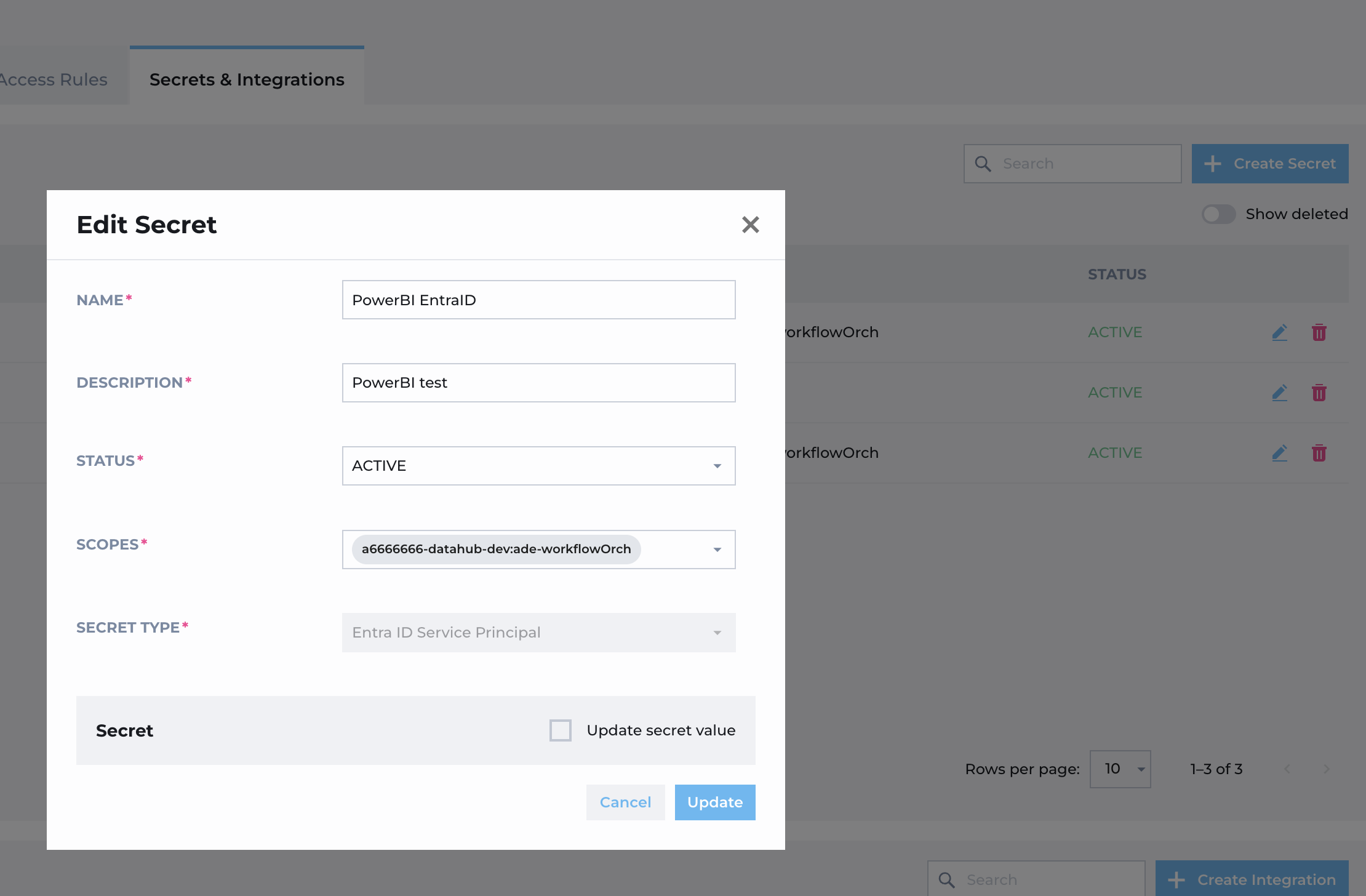
If having the rights to manage integrations from the Admin UI, an secret can be added for the PowerBI and target scope for the tenant (Here a6666666) DEV runtime.
Then an integration is added for PowerBI using the secret.
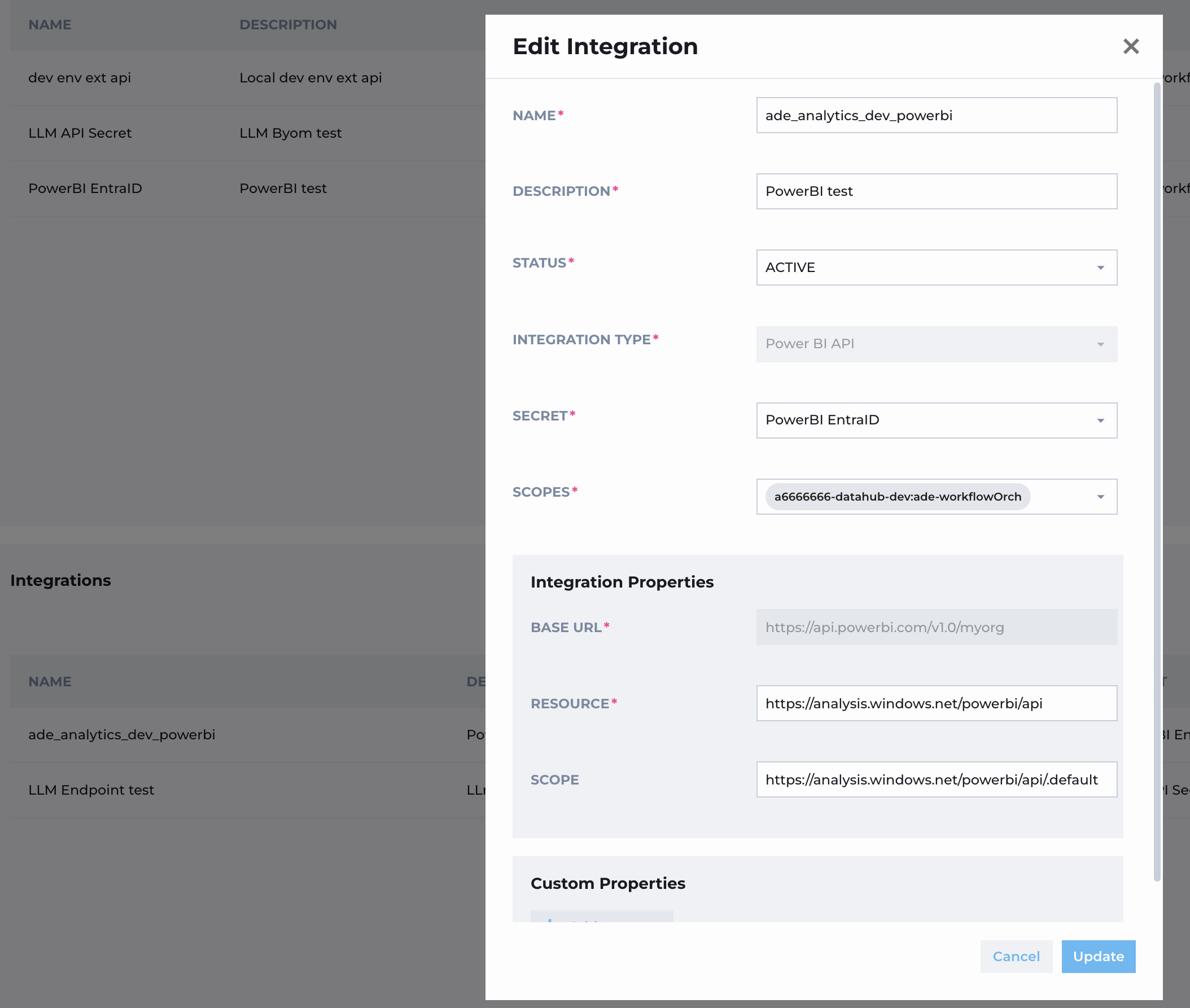
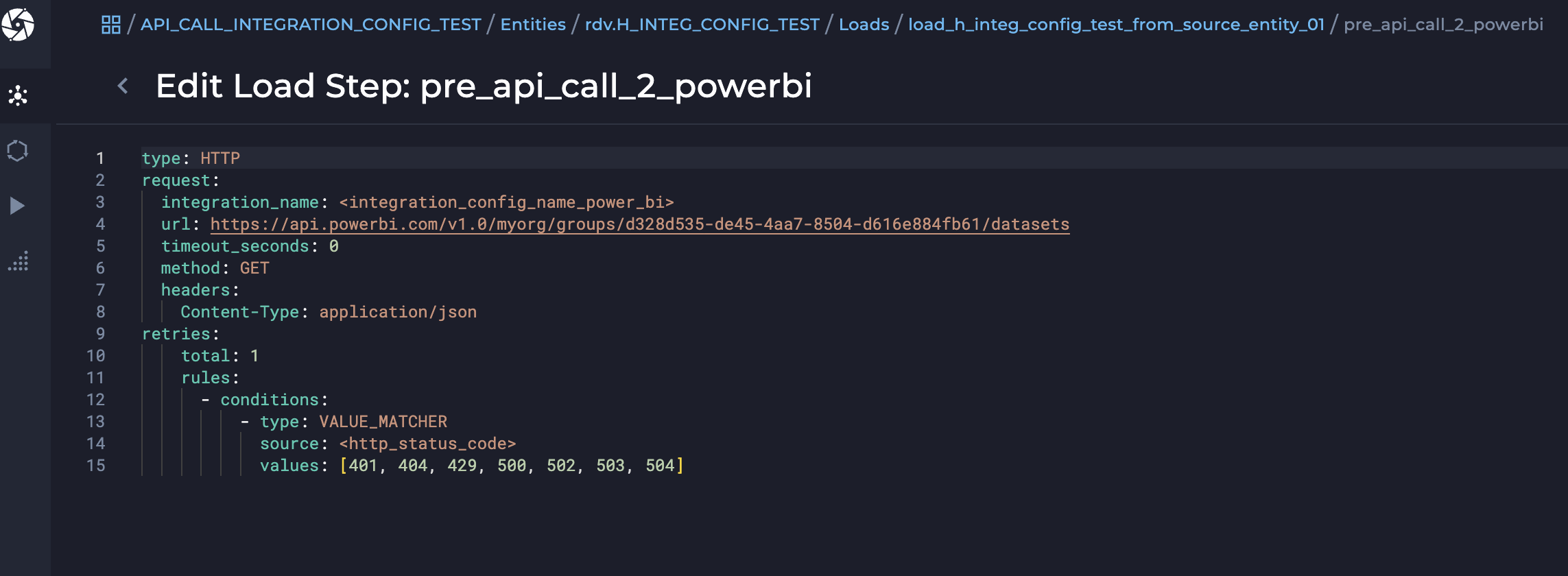
After the integration with the name “ade_analytics_dev_powerbi” is added in the Admin UI and scoped for the tenant DEV -runtime, it can be used with an load step using the API CALL and having the integration name configured. In this example, the integration name is configured by an variable integration_config_name_power_bi -which is configured in CONFIG_ENVIRONMENT_VARIABLES package.
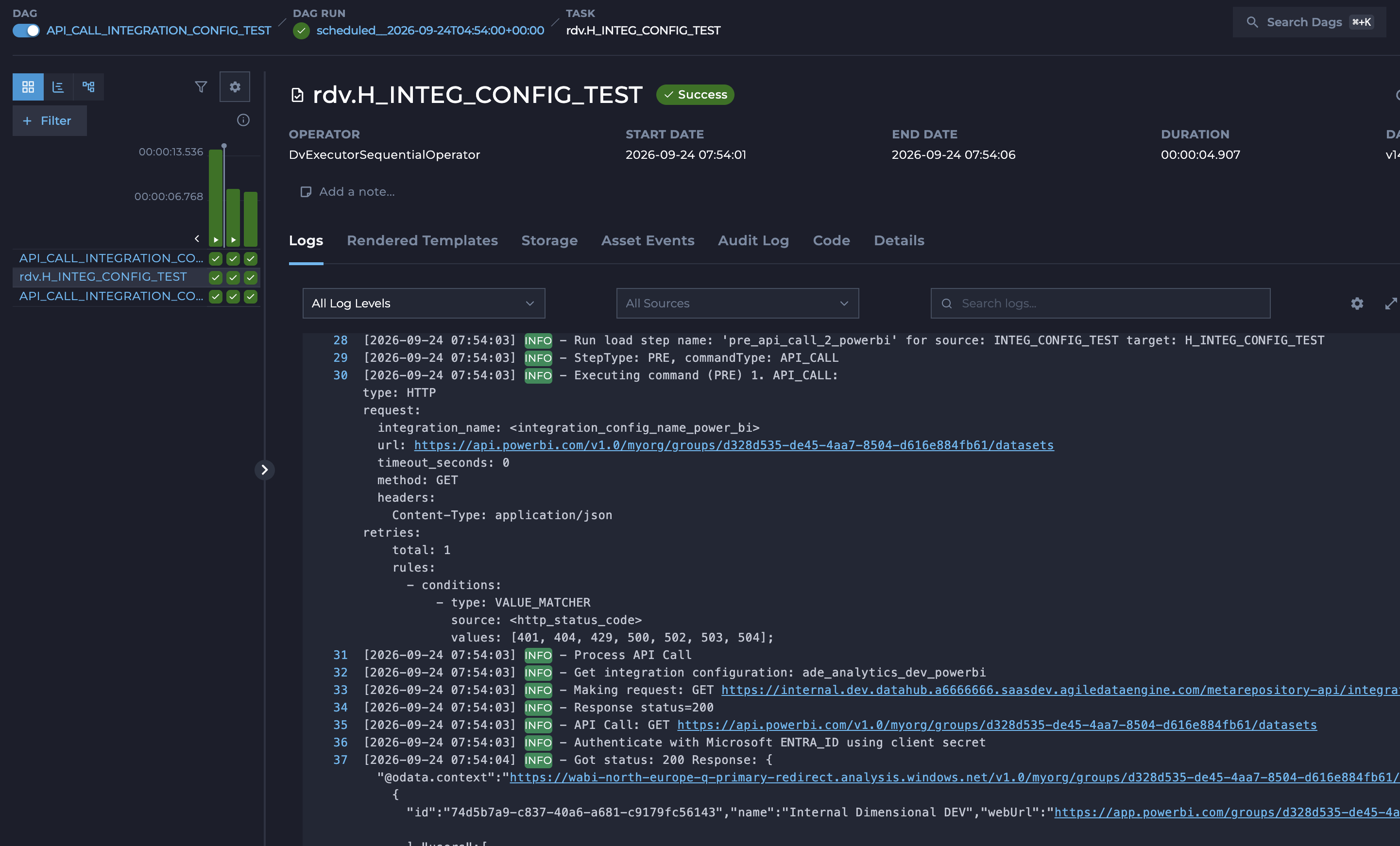
When this package with the load step is deployed to ADE DEV Runtime, the load can be executed an check does it authenticate to the PowerBI.
Using BYOM LLM for ADE Insights
If needing to use own dedicated LLM model for the ADE Insights search instead of the ADE Provided one, it can be configured by the integration configuration from the Admin UI if having the rights to manage the integrations.
Add an API Key type of sercet. It should be now scoped to the tenant (Here a6666666) insight.
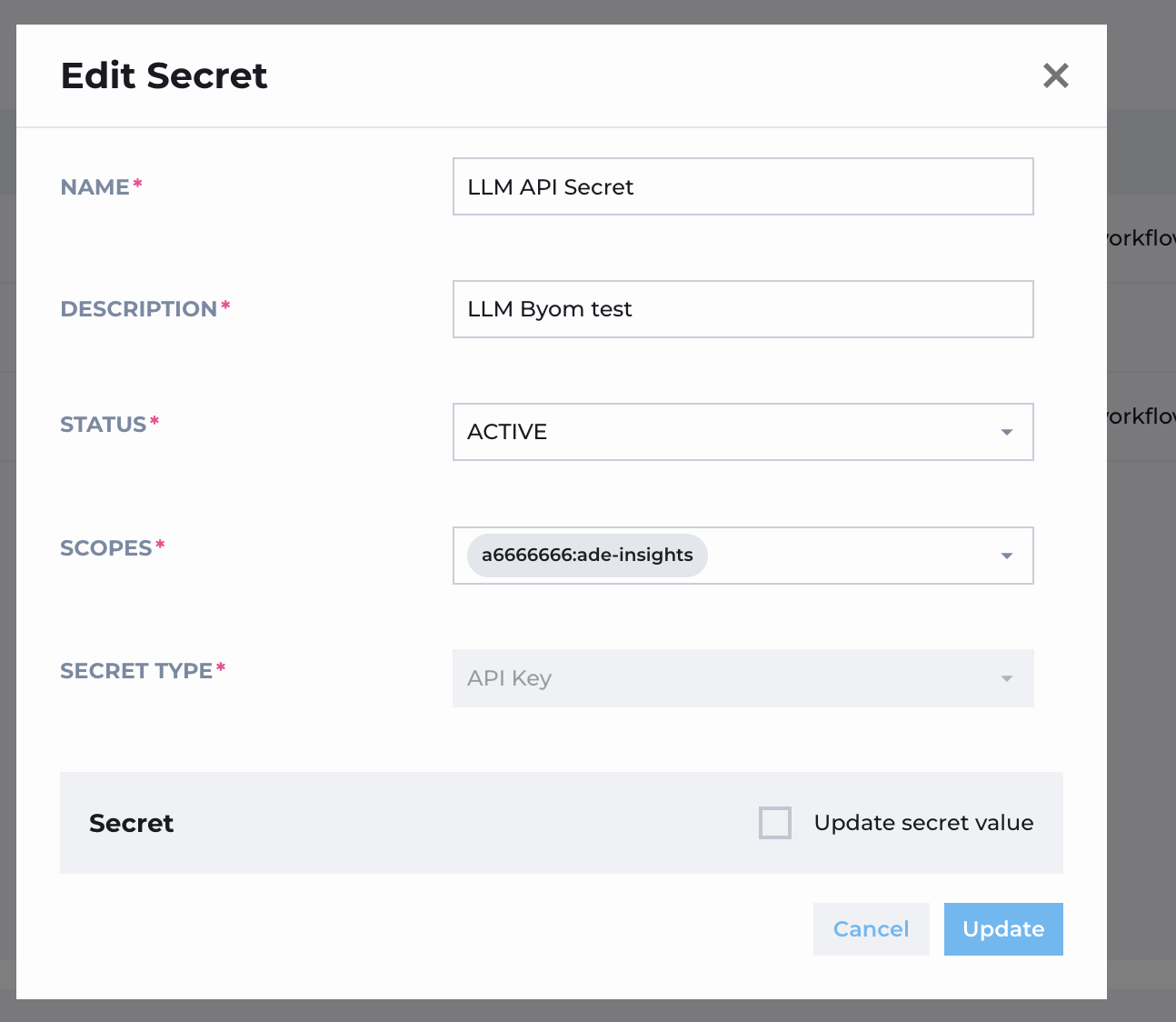
Then add an Open AI LLM -type of integration using the secret and scoped for the insights.
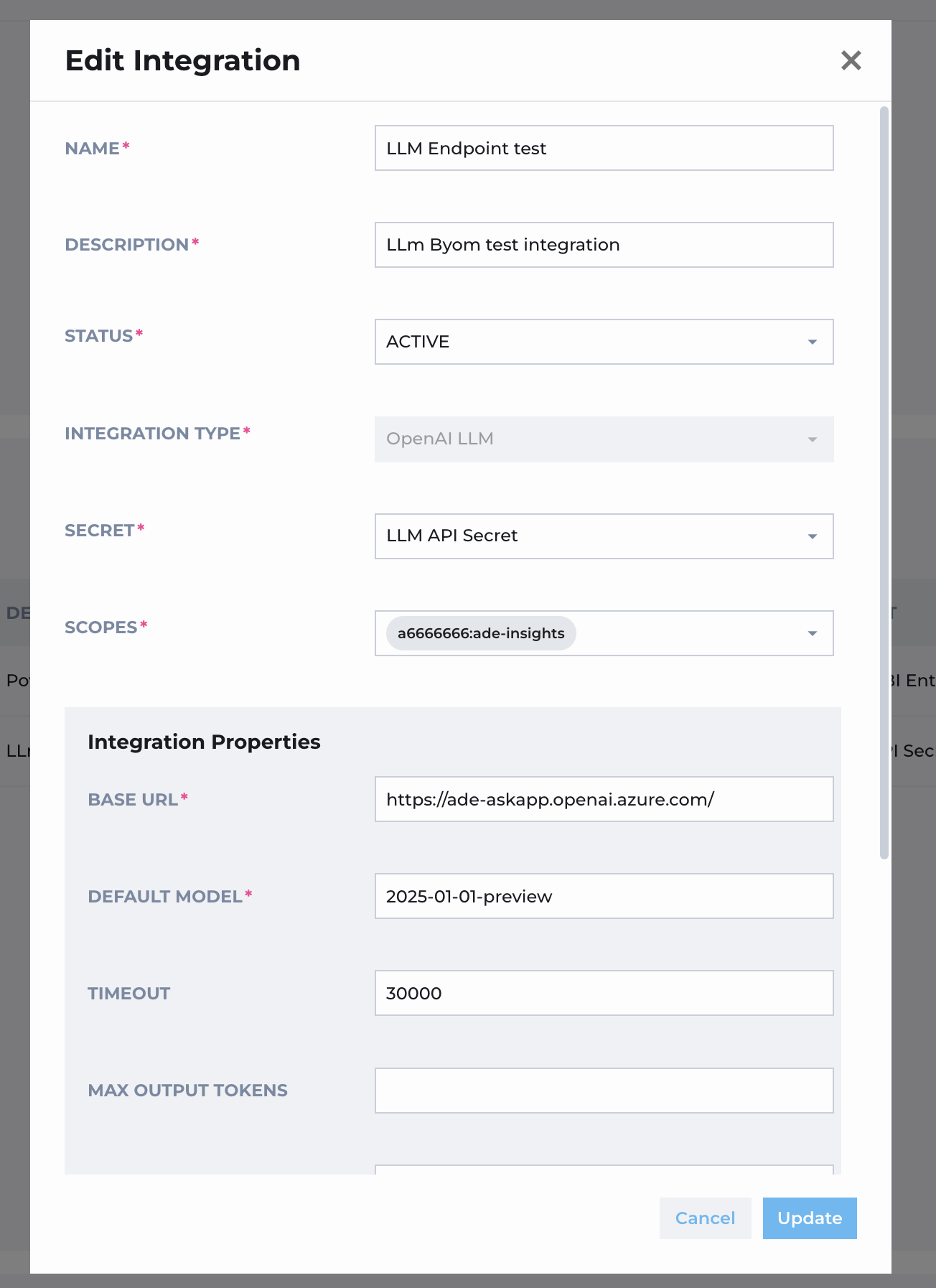
When this secret is done and active, the ADE insights AI search will pick it up and try to use it.
If there is some issues with using the BYOM LLM integration, it will be seen as generic error when using the Insights AI search for the tenant, then need to ask for ADE Support to see the details of the error.